

What is a phishing simulation?
A phishing simulation sends employees a message that imitates a real attack, such as a fake password reset, a shared document or a supplier asking for updated bank details, and records what each recipient does with it. The possible outcomes are ignoring it, reporting it, opening a link, entering credentials or replying.
Three things separate a simulation from neighboring activities:
- From a penetration test: a pentest tries to break in by any means and reports technical findings. A simulation tests one human behavior under controlled conditions and feeds a training loop.
- From awareness training: training explains how attacks work. A simulation lets people practice recognizing and reporting an attack in their normal inbox, phone or meeting tool.
- From a one-off "gotcha" test: a program repeats, adjusts difficulty, and gives feedback immediately after an interaction instead of publishing a list of who failed.
Why companies run phishing simulations
Phishing remains a major initial access route, particularly in attacks that target employees directly. The Verizon 2025 Data Breach Investigations Report found the human element involved in around 60% of breaches, roughly unchanged from the previous year. For the EU, ENISA's Threat Landscape 2025, covering July 2024 to June 2025, reported phishing (including vishing, malspam and malvertising) as the initial intrusion vector in around 60% of the 4,875 incidents it analyzed.
Email filters block most malicious messages, but not all of them. In a worked example in the UK NCSC's phishing guidance, filtering stopped 1,750 of 1,800 malicious emails sent to a company of around 4,000 staff; the remaining 50 reached employees. The fastest detection you have for messages like those is often an employee who reports one before anyone else interacts with it. A simulation program exists to make that report more likely and faster.
How a phishing simulation program works
A program has six steps. Steps 1 and 2 decide whether the rest is usable, and they are the ones most often skipped.
- Set the goal and a baseline. The security lead decides what behavior should change (for example, "more employees report suspicious messages within 30 minutes") and runs a first campaign without prior announcement of the date to measure the starting point.
- Agree the rules with stakeholders. Data protection, HR, the works council where one exists, and IT agree on what data is collected, who sees it, and what happens after a click. IT allowlists the simulation infrastructure so security tools do not block or pre-click the emails.
- Segment by role and exposure. Finance, HR, executive assistants and help desk staff face different attacks than warehouse or field staff. The department examples below show what that means in practice.
- Choose scenarios from current threats and control difficulty. Scenarios should mirror attacks your sector actually sees. Difficulty should change on purpose, not by accident, because it drives the results (see "What to measure").
- Run the campaign and teach at the moment of interaction. Someone who clicks or enters data gets a short explanation of what they missed, right away and without blame. Someone who reports gets confirmation that reporting was correct.
- Review, debrief and adjust. The team looks at results by group and channel, shares what worked with employees, and sets the difficulty and scenarios for the next round.
Phishing simulation examples by department
Department-specific scenarios test the decisions people actually make in their jobs. The three examples below describe the pretext and the behavior under test, not how to build the attack. For scenario ideas by sector, see the phishing simulation matrix by industry.
| Department | Pretext | Channel | Behavior tested | Desired response | Success metric |
|---|---|---|---|---|---|
| Finance | A known supplier asks to update the bank account for upcoming invoices | Email from a lookalike supplier domain | Whether payment details are changed on the basis of an email alone | Verify the change by calling the supplier on the number already on file, then report the email | Report rate and share of recipients who did not act on the request |
| HR | A shared document labeled as an applicant file or policy update requires a sign-in to open | Email with a document-sharing link | Whether staff enter credentials on a page reached from an unexpected link | Do not sign in; report the message; open shared files only from the known document platform | Data-entry rate (lower is better) and report rate |
| IT / help desk | A caller claiming to be a traveling employee asks for a password or MFA reset because they are locked out | Phone call to the help desk | Whether the agent follows the identity verification procedure under time pressure | Complete the documented verification steps or call back on a number from the directory before resetting | Share of calls where the verification procedure was completed |
Beyond email: SMS, phone and deepfake simulations
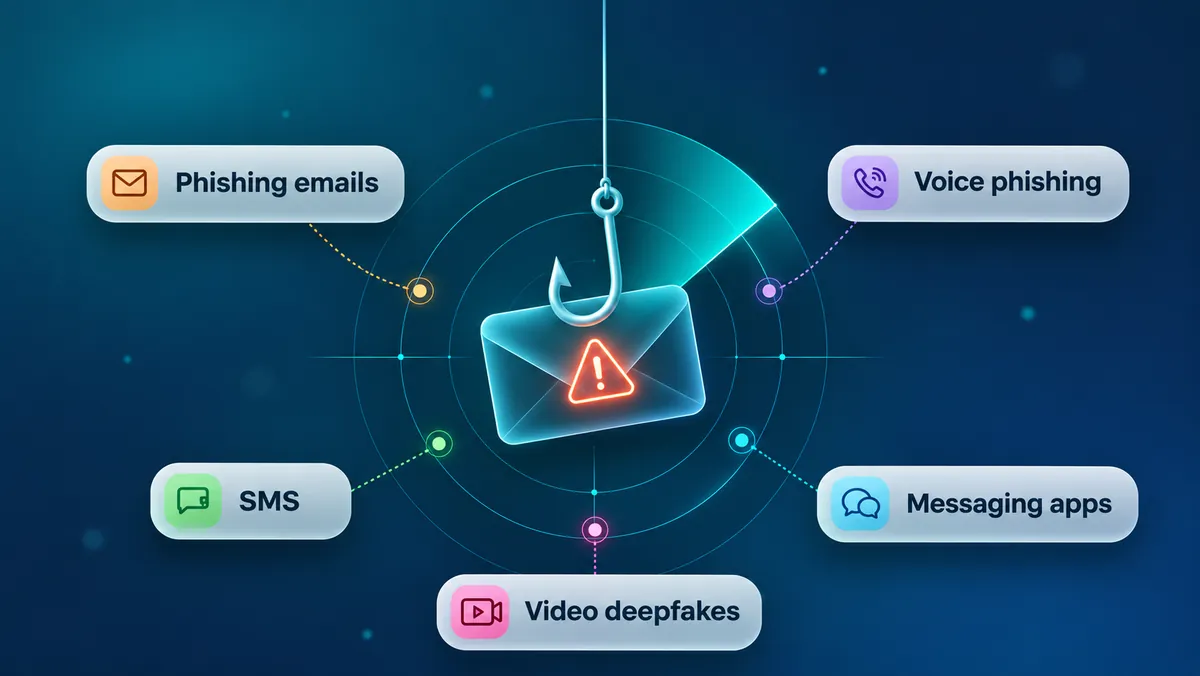
Attackers do not stay in the inbox. A common pattern starts with an email and follows up with a phone call from a supposed IT colleague or executive, or moves the conversation to a messenger. Voice cloning and deepfake video now let attackers impersonate a specific person on a call or in a video meeting. Each channel has its own name:
- Smishing: phishing by SMS, often with a link to a fake login page or a parcel notice.
- Vishing: voice phishing by phone, where the caller uses authority or urgency to get a password reset, a payment or remote access. The vishing guide covers how AI voice phishing works.
- Deepfake meetings: a live or prerecorded video in which a cloned face and voice ask for an action. A prerecorded clip and a live, two-way conversation test different things, so check which one a simulation actually delivers.
Email-only programs miss the behavior that matters most in these attacks: verifying a request through a separate, known channel before acting on it.
Example scenario (illustrative): An accounts payable clerk receives an email that appears to come from the CFO, asking for an urgent payment to a new vendor before a deal closes. Ten minutes later, a caller with the CFO's voice phones to confirm the request and asks the clerk to skip the usual approval because of time pressure. The clerk says she will call back, phones the CFO on the number in the company directory, learns the CFO made no such request, and reports both the email and the call. A multichannel simulation measures whether that verification step happens.
What to measure: report rate beats click rate
Click rate is the number most programs report. It is useful, but difficult to interpret without accounting for lure difficulty. In a randomized trial with more than 19,500 employees at UC San Diego Health, Ho et al. (IEEE S&P 2025) found average failure rates ranging from 1.82% for one lure to 30.80% for another. revel8's own simulation data points the same way: across more than 100,000 security simulations at multiple organizations, revel8 reported interaction rates of 39% for document- and task-related lures, 25% for communication invites and 20% for task-management alerts, compared with about 1% for generic, non-contextualized templates. NIST's Phish Scale was built for this reason: it rates how hard a phishing email is to detect, based on its cues and how closely its premise fits the recipient's work.
Use these definitions so results stay comparable across campaigns:
| Metric | What it counts | What it tells you | Watch out for |
|---|---|---|---|
| Report rate | Recipients who reported the message through the official channel | Whether people use the reporting path | Reports from people who also clicked still count |
| Time to first report | Minutes from delivery to the first report in a campaign | How fast the security team could react to a real attack | One fast reporter can make this look good while most people never report |
| Median time to report | The middle value of all reporting times | How quickly reporting typically happens | Different from time to first report; state which one you show |
| Interaction rate | Recipients who opened a link, opened an attachment or replied | Exposure to the lure | Security scanners can generate clicks; filter them |
| Data-entry rate | Recipients who submitted credentials or other data | The most serious outcome | Never store the entered passwords |
| Repeat interaction | People who interacted in several campaigns | Where targeted support helps | Report at group level where the works council requires it |
The three core rates share one denominator, the number of delivered messages:
- Report rate = recipients who reported ÷ messages delivered
- Interaction rate = recipients who interacted (link, attachment or reply) ÷ messages delivered
- Data-entry rate = recipients who submitted data ÷ messages delivered
Delivered messages are usually fewer than the target list. Addresses bounce, mailboxes are deactivated, and some messages end up in quarantine despite allowlisting. Using the original target list as the denominator understates every rate, so record targeted, delivered and excluded counts separately for each campaign.
A click is not a compromised account, and a campaign with a low click rate is not automatically a success. Compare results only between campaigns of similar difficulty, and track the trend of report rate and time to report over several rounds. NIST SP 800-50 Rev. 1 lists the share of employees who appropriately report a phishing test as an example of a behavior-change metric.
Does phishing training work? What the evidence says
The published evidence suggests training improves reporting more consistently than it reduces clicking. That evidence comes from a small number of large studies, each at a single organization or data set, so treat it as a strong signal rather than a rule that holds everywhere.
- Annual training was not associated with fewer failures. In the Ho et al. study, whether employees had recently completed annual awareness training showed no significant relationship with failing a simulation. This part of the study is observational. The embedded-training part was randomized: employees who received training after a failed simulation had a failure rate only 1.7 percentage points lower on average than the control group, and more than half of the training sessions ended within 10 seconds.
- Embedded training did not make employees more resilient in a second large study. Lain et al. (IEEE S&P 2022) ran a 15-month field experiment with more than 14,000 employees at one large company. Employees who received embedded training after clicking were more susceptible to later simulations, not less.
- Recent training is associated with more reporting. The Verizon 2025 DBIR found that users who had training within the last 30 days reported simulated phishing at about 21%, against a base rate of 5%, while the relationship with click rate was much weaker. This is a correlation in partner data, not a controlled experiment. In the Lain et al. study, employees reported 918 real phishing emails over five months, which the security team could use to find and block related campaigns.
The practical conclusion: design simulations to train and reward reporting, give feedback in context, and avoid treating a single click as failure. The UK NCSC makes the same point from a defender's perspective. Its phishing guidance recommends layered technical controls, warns that punishing clicks erodes trust and reporting, and advises checking simulation plans with HR first.
Running phishing simulations in the EU: GDPR and works councils
Are phishing simulations legal in the EU? Generally yes, if they are designed as a security measure with a clear purpose and limited data. Employers need a valid legal basis under the GDPR, must respect national employment and data protection law, may need a data protection impact assessment, and in Germany must involve the works council where one exists.
A phishing simulation processes personal data about how named employees behave, so it needs a defined purpose and limits on who sees what. These are the questions to settle before launch:
- Legal basis. Legitimate interests under Art. 6(1)(f) GDPR is a potential legal basis that many employers consider. It is not automatically the right one for every employer: the balancing test depends on design choices such as pseudonymization and reporting level, and national employment data protection rules in some member states add their own requirements.
- Impact assessment. Whether a data protection impact assessment under Art. 35 GDPR is required depends on the actual processing, for example how much individual behavior is recorded and who can see it, and on the lists published by national supervisory authorities. The GDPR checklist for phishing simulations and the DPIA template walk through both.
- Data minimization. Decide what is stored (interaction type, time, group), for how long, and whether results are shown per person or only per group. Entered passwords should never be stored.
- Works council (Germany). Where a works council exists, it has a co-determination right under § 87(1) no. 6 BetrVG over technical systems designed to monitor employee behavior or performance. A platform that records who clicked and who reported is likely to be in scope, so plan for a works agreement that fixes purpose, data, reporting level and consequences. A works agreement template with 8 clauses gives a starting point.
- NIS2. Art. 21(2)(g) of the NIS2 Directive requires in-scope entities to implement basic cyber hygiene practices and cybersecurity training, and Art. 20(2) requires management bodies to take part in training. NIS2 does not mention phishing simulations; simulations are one way to show that training changes behavior.
This is not legal advice. Involve your data protection officer and, where applicable, the works council early.
Before the first campaign: a sign-off checklist
Many programs stumble at launch: emails blocked by IT, a works council that learns about the campaign from employees, or a lure that touches salaries and causes an HR incident. This checklist assigns each check to an owner and names the evidence an auditor or works council would expect.
| Check | Owner | Evidence |
|---|---|---|
| Goal and metrics defined (report rate, time to report) | Security / awareness lead | One-page program plan |
| Legal basis and DPIA decision documented | Data protection officer | Balancing test or DPIA |
| Works agreement concluded or consultation documented, where a works council exists | HR and works council | Signed agreement or minutes |
| Reporting level fixed (group vs. individual) and minimum group size | Data protection and works council | Clause in agreement |
| Simulation domains and IPs allowlisted, scanner clicks filtered | IT / email security | Change ticket |
| Lure topics excluded (salary, bonuses, health, layoffs) | HR and security | Scenario list |
| Feedback page and help desk script ready | Awareness lead and help desk | Landing page, FAQ for help desk |
| Escalation path for real incidents found during the campaign | Security operations | Runbook entry |
Common mistakes
- Publishing who failed. Naming people damages trust and reduces reporting, which is the behavior you want.
- Using lures that cross a line. Fake bonus or layoff messages create real stress and HR complaints. Agree excluded topics in advance.
- Reporting only click rate. A falling click rate after switching to easier lures looks like progress and is not.
- Running once a year. A single annual campaign gives a snapshot, not a trend, and no practice.
- Forgetting IT. Security tools that pre-click links inflate interaction numbers; blocked emails produce empty results.
- Testing only email. Phone and video attacks need a separate verification habit that email campaigns do not train.
Build, buy or use Microsoft 365?
Three routes are common, and they suit different situations.
Open-source tools give full control at no license cost, but your team builds templates, landing pages, reporting and feedback itself, and maintains the infrastructure. This fits teams with time and a narrow, email-only scope.
Microsoft 365 Attack Simulation Training comes with Microsoft 365 E5 or Defender for Office 365 Plan 2. It covers email-based simulations inside the Microsoft environment. The comparison of the M365 Attack Simulator with dedicated platforms looks at where it fits and where it stops.
Dedicated platforms add other channels, scenario libraries, adaptive difficulty and works council features. Compare them on channels, hosting location, data processing agreement, reporting levels and how scenarios are kept current.
How revel8 runs phishing simulations
revel8 runs simulations across email, voice calls, SMS, WhatsApp, Telegram, Teams and deepfake video, and a single simulation can start in the inbox and escalate to a phone call. Scenarios are built from threat intelligence and matched to role, team and tooling; difficulty adjusts to each group's awareness level. Every simulation comes with a 60-second lesson for the scenario the employee just saw. Personal OSINT used to make scenarios realistic is collected only with consent.
Employees report suspicious messages with one click in Outlook, Gmail or on mobile. revel8 combines reporting rate, interaction rate and time-to-report into an Awareness Score with drilldowns by group, channel and campaign, with reporting anonymized at group level by default. The platform is hosted in Germany on STACKIT.
If you are planning a program and want to see a multichannel simulation and the works council setup in practice, book a demo.