Device-Code Phishing: How Attackers Abuse Legitimate Services to Bypass MFA
.avif)

Trusted platforms are being used as delivery infrastructure for a technique that defeats standard two-factor authentication
Most phishing defenses are built around a simple assumption: the attacker needs your password, and if they get it, your second factor like an authenticator app, a push notification, a hardware key usually stops them. A technique now circulating widely, known as device-code phishing, breaks that assumption completely. It doesn't steal a password or intercept a one-time code, instead it convinces you to hand over a fully logged-in session, MFA already satisfied, without you ever realizing what you authorized.
A feature built for smart TVs, repurposed for theft
The technique abuses a real, legitimate part of the OAuth 2.0 standard called the Device Authorization Grant. It exists to solve an ordinary problem: how does a smart TV, a game console, or a command-line tool let you log into your Microsoft or Google account when it doesn't have a convenient way to type a password. The device displays a short code and a URL. You open that URL on your phone or laptop, enter the code, log in with your password and MFA included, and the TV or CLI tool on the other end is granted access to your account.
It's a clever, useful piece of infrastructure. It's also, if you squint, a machine for laundering authorization from a screen you trust to a device you can't see.
How the attack actually works
Here is the part that should concern the security team: the attacker doesn't need to build anything resembling a fake login page. They use Microsoft's real login page, at the real login.microsoftonline.com address, with a valid certificate and no spoofing involved at all.
The attack unfolds in five steps:
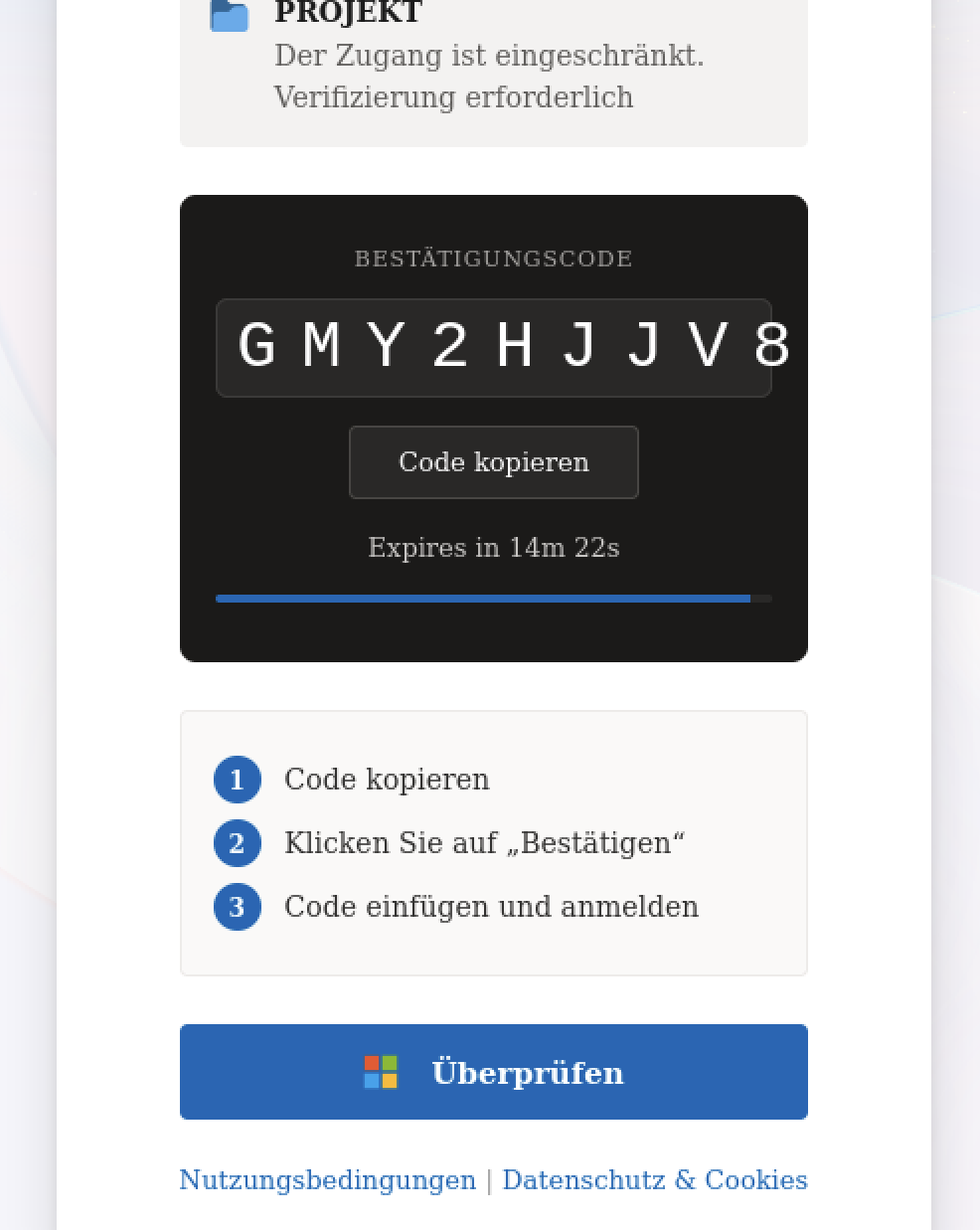
1. The attacker's tool requests a device code from Microsoft. This is a routine, unauthenticated API call - Microsoft has no way to know at this stage whether the request came from a smart TV or a criminal's laptop. Microsoft returns a short alphanumeric code (something like GMY2HJJV8) and starts a countdown, typically 15 minutes.
2. The attacker sends the victim a lure. In observed campaigns, this has taken the form of a "shared document" email - a fake SharePoint notification, a fake DocuSign request, a calendar invite for a Teams meeting, anything that plausibly ends with "verify your access to continue” like.
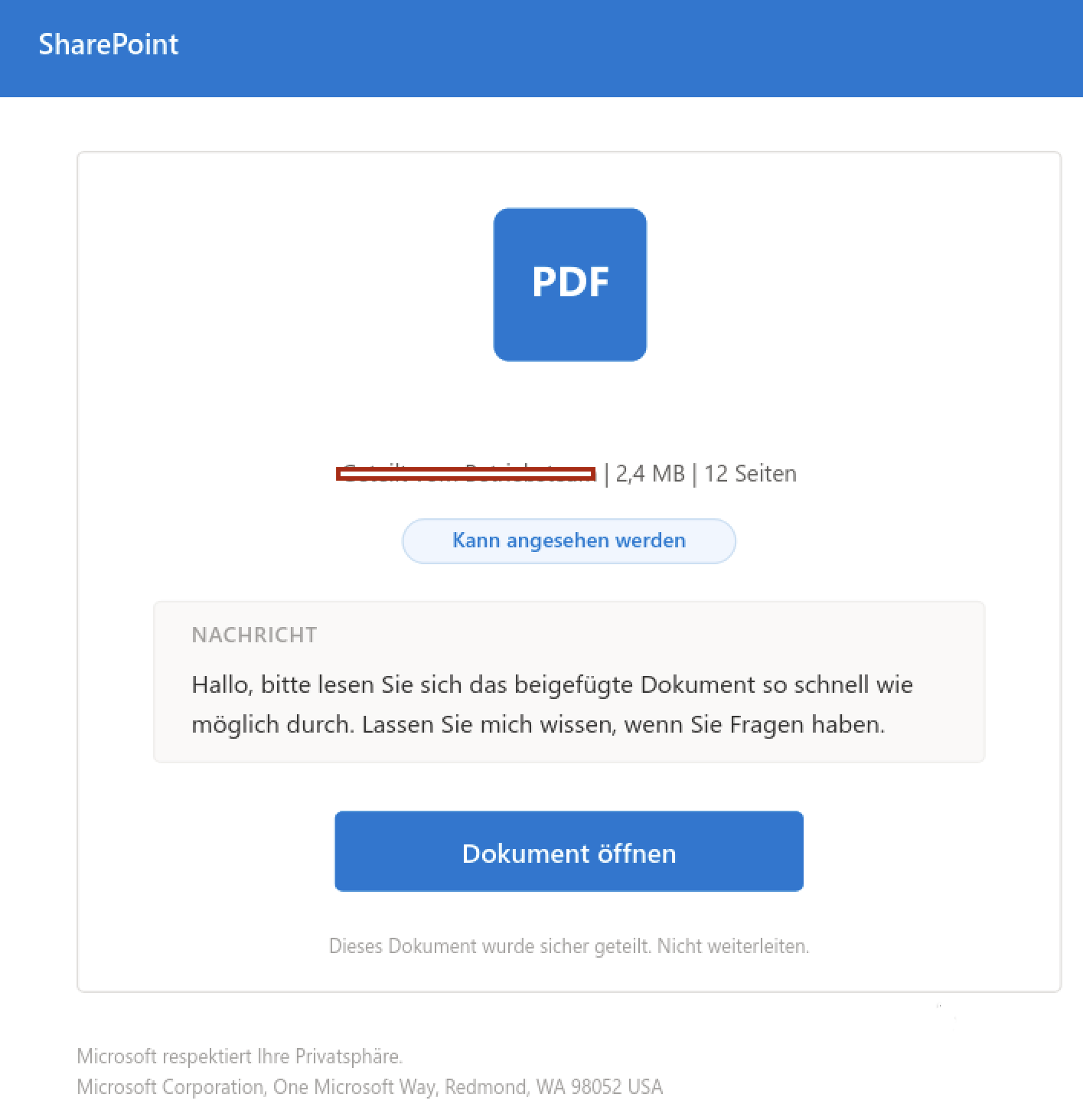
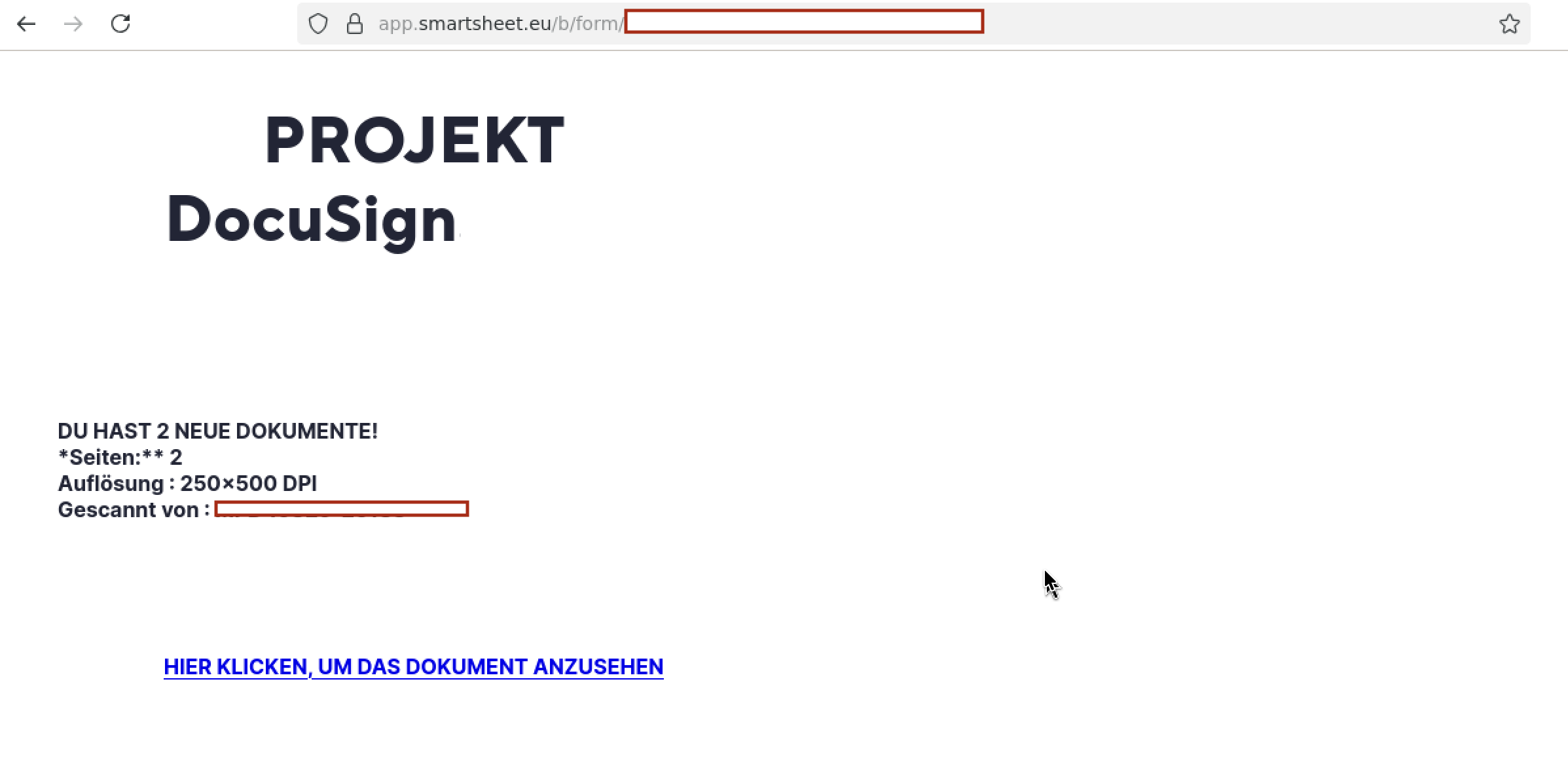
3. The victim walks through a chain of trusted-looking redirects. Rather than linking directly to a suspicious domain, the lure often routes through legitimate SaaS platforms — a fake SharePoint file-share card as the initial attachment, a form hosted on Smartsheet, a file staged on Amazon S3 — before finally landing on the attacker's own page. None of these platforms are compromised or complicit; the attacker is simply an ordinary customer using each service's normal, self-serve tools exactly as intended. Each hop is chosen because it carries a clean reputation with corporate email filters and URL scanners, which generally trust well-known platforms more than freshly registered domains. By the time the victim reaches a domain that actually looks suspect, most automated filtering has already been satisfied.
4. The landing page displays the attacker's device code and instructs the victim to enter it — at Microsoft's genuine site. This is the crux of the deception. The victim isn't asked to type a password into a fake page. They're told to copy a code and paste it into login.microsoftonline.com, a domain their browser correctly shows as secure, because it is.
5. The victim logs in normally. Password, MFA prompt, everything works exactly as it should. Microsoft's servers see a legitimate, fully authenticated login. The token generated by that login, however, is delivered to the session the attacker opened in step one, not to the victim's own device. The victim may see a generic "access granted" message, or nothing at all. The attacker now holds a live, authenticated session to the victim's account.
Why this defeats "phishing-resistant" MFA
Most MFA methods: push notifications, authenticator app codes, even hardware security keys in some configurations, are designed to protect the login form. They verify that the person entering the password is also in possession of a registered second factor. Device-code phishing doesn't touch the login form at all. The victim's MFA challenge is real, and they satisfy it correctly, on the genuine site, using their genuine device. The vulnerability isn't in the authentication - it's in the fact that authorizing a device and authorizing yourself look identical from where the victim is standing.
This is precisely why Microsoft's threat intelligence team has tracked this technique as an active concern (publicly associated with the actor cluster Storm-2372), typically delivered through exactly the kind of document-sharing and meeting-invite lures described above.
What this looks like in practice
A real-world example observed recently followed this exact pattern: an email impersonating a routine internal document share, with a PDF attachment styled as a SharePoint file card. The attachment's "Open document" button led not to a document but through two separate reputation-laundering hops — a form hosted on Smartsheet, then a file staged on Amazon S3 — before finally reaching a page that displayed a Microsoft device code and a 15-minute countdown, instructing the visitor to complete verification at Microsoft's real login portal.
Defending against it
Because the technique sidesteps traditional credential-phishing defenses, the countermeasures look different too:
- User awareness has to be specific. "Don't enter your password on suspicious sites" doesn't cover this attack, because no password is entered on a suspicious site. The message that matters is narrower: never enter a device code or verification code at the prompting of an external email, chat message, or link. Legitimate device sign-in is something you initiate yourself, on the device you're trying to authorize — never something a message asks you to complete on its behalf.
- Restrict the flow at the source, if you can. Most organizations don't rely on the device authorization grant for everyday logins. Conditional Access policies in Microsoft Entra ID can restrict or disable this flow entirely for users who don't need it, closing off the technique at the protocol level rather than relying on every employee to recognize the lure.
- Watch for anomalous token issuance, not just anomalous logins. Because the "login" itself is completely legitimate, detection has to focus on what happens after — sign-ins from unfamiliar devices or locations receiving tokens issued via the device code flow are a stronger signal than login failure rates or password-spray patterns.
- Treat trusted-platform redirects with suspicion, not reassurance. A link that passes through a recognizable SaaS or cloud storage domain is not inherently safer — it's increasingly a sign that the destination further downstream is exactly the thing worth being cautious about.
The uncomfortable lesson of device-code phishing is that the weakest point in a login flow isn't always the password box. Sometimes it's a much older assumption: that if a request comes from the real login page, it must be a request you actually meant to make.




.avif)